11/19 Notice of Upcoming Server Transfer Service
 Architect

Hello,
Experience an infinite world, this is Architect: Land of Exiles!
We would like to inform you about the ‘Server Transfer Service,’ which allows you to transfer all characters on your current server to another server.
If you are planning a server transfer, please carefully review the transfer schedule, eligibility requirements, and details of the information that will be transferred.
Additionally, Character Name Change Tickets will be made available for purchase as part of this Server Transfer update.
Please refer to the details below for more information.
Server Transfer Overview
■ Server Transfer Schedule
- Account Server Transfer: 2026. 11. 19 (Thu) 23:00 ~ 2026. 11. 22 (Sun) 22:59 (UTC+8) (3 days)
- Clan Server Transfer: 2026. 11. 19 (Thu) 23:00 ~ 2026. 11. 21 (Sat) 22:59 (UTC+8) (2 days)
- ※ Applications for certain servers may close early depending on the number of the transfer requests received for each server.
■ Server Transfer Requirements
- Account Server Transfer: Characters must be Level 45 or higher.
- Clan Server Transfer: The Clan Leader must have a character at Level 45 or higher, and the Clan must be at least Level 20.
■ Server Transfer Ticket Costs
- Account Server Transfer: 1,000 Diamonds (Once on each server transfer)
- Clan Server Transfer: 4,000 Diamonds (Once on each server transfer)
- ※ Any unused Server Transfer Tickets remaining after the transfer period will be refunded in the form of the currency used for their purchase.
■ Server Transfer Limit
- Account Server Transfer: Once per server
- Clan Server Transfer: Once per server
■ Available Transfer Server
- ‘Kullara’ and ‘Schdat’ Server: Can transfer to any server within the Global Region
- Other Servers: Can transfer to any server within the Global Region, excluding Kullara and Schdat.
- ※ Server transfers between the Korea Region and Global Region are not permitted.
■ Character Name Change Ticket Sale
Your current character name and Clan name will remain unchanged after completing a server transfer.
To give you the opportunity to embark on a new adventure with a fresh name on your server, the Character Name Change Tickets will be available for purchase.
- Sale Period: 2026. 11. 18 (Wed) after the maintenance.
- Character Name Change Tickets can be purchased from the [Shop] (Limited to one purchase per server)
Server Transfer Precautions
■ Account Server Transfer
- When performing an Account Server Transfer, all characters on the selected account will be transferred together. Individual character transfers are not supported.
- All characters, owned items, research progress, costumes, Phantom Weapons, and other related data on the source server will be transferred together.
- Even if character data already exists on the destination server, the existing data will not be deleted and will remain intact.
- If you transferred your account to a server where a character already exists, you can access your desired character by using the 'Change Account' button on the character selection screen.
- For transferred characters, the waiting periods for rejoining a Clan or creating a new Clan will be reset.
- The Friends List and Enemies List of transferred characters will be reset.
- The transferred character will also be removed from the friend lists of any characters who had added them as a friend.
- Characters with no login record after a server transfer will not be included in the rankings.
- Read mail that has not been stored in the Important tab will be deleted.
■ Clan Server Transfer
- Following the completion of a Clan Server Transfer, Clan members will be granted a 3-hour guaranteed period.
- For servers to which the Clan has transferred during the guaranteed transfer period, Clan members are guaranteed an Account Server Transfer, regardless of whether the destination server is closed to transfers.
- Clan members must separately purchase and use an Account Server Transfer Ticket to apply for a server transfer.
- Once you complete your transfer application to the server your Clan has transferred to within the guaranteed transfer period, you will automatically rejoin the Clan.
- If the Clan Leader completes a server transfer application, Clan Members will automatically be removed from the Clan. However, if Clan Members apply to transfer to the same server within the guaranteed transfer period, they will automatically rejoin the Clan.
- If you do not apply to transfer to the same server within the guaranteed transfer period, your account data will remain on your original server.
- ※ You may also freely apply to transfer to a different server instead of the server selected by the Clan Leader.
- ※ If you transfer to a different server, your Clan Contribution will be reset, and you will be unable to create a new Clan or join another Clan for a certain period of time.
- If a Clan occupying a Monolith transfers to another server, its occupation rights over that Monolith will be revoked immediately.
- Any accumulated taxes (revenue) will be forfeited and will not be distributed.
- Once the occupation rights over a Monolith are revoked, buffs cannot be purchased at that Monolith occupation site until a new Clan takes control of it.
Server Transfer Information
■ Account Server Transfer Information
| Category | Item | Transfer Status |
|---|---|---|
| Name | Character Name | Ο |
| Clan Name | Ο | |
| Content | Content Unlock Requirements | Ο |
| Quest | Epic Quest Progress and Rewards | Ο |
| Sub-Quest Progress and Rewards | Ο | |
| Commission Quest Progress and Rewards | Ο | |
| Archive Progress and Rewards | Ο | |
| Guidebook | Guidebook Progress and Rewards | Ο |
| Season Pass | Mission Progress | Ο |
| Reward Claim Status | Ο | |
| Mailbox | Character Mail | Ο |
| Account Mail | Ο | |
| Server Mail | Ο | |
| Inventory | Inventory Slots | Ο |
| Stored Items | Ο | |
| Equipment Items | Ο | |
| Equipment | Equipment Binding Information | Ο |
| Enchantment Information | Ο | |
| Awakening | Cell Unlock Status by Page | Ο |
| Cell Re-awakening Status by Page | Ο | |
| Overall Awakening Effects by Page | Ο | |
| Resonance | Abyssal Resonance: Resonance Intensity | Ο |
| Abyssal Resonance Presets | Ο | |
| Tuning | Tuning Unlock Information | Ο |
| Tuning Level Information by Unlocked Category | Ο | |
| Currency | Total Currencies (Diamonds/Gold/Mileage, etc.) | Ο |
| Stash | Stored Items | Ο |
| Expansion Slots | Ο | |
| Favorites List | Ο | |
| Crafting | Recipe Activation Status | Ο |
| Crafting Limit Information | Ο | |
| Monolith War | Occupation Status | X |
| Achievements | Progress by Category | Ο |
| Reward Claim Status | Ο | |
| Rankings | Ranking by Category | X |
| Skills | Acquired Skills | Ο |
| Skill Level | Ο | |
| Specialized Information | Ο | |
| Spellstone | Ο | |
| Owned Items | Ο | |
| Owned Stats | Ο | |
| Mounts | Ascension Information | Ο |
| Equipped Item Information | Ο | |
| Potential Information | Ο | |
| Owned Items | Ο | |
| Owned Stats | Ο | |
| Glider | Ascension Information | Ο |
| Equipped Item Information | Ο | |
| Potential Information | Ο | |
| Owned Items | Ο | |
| Owned Stats | Ο | |
| Keyring | Training Information | Ο |
| Companion Item Information | Ο | |
| Limit Break Information | Ο | |
| Owned Items | Ο | |
| Owned Stats | Ο | |
| Costume | Pending Confirmation Information | Ο |
| Crystal of Binding | Ο | |
| Emperor’s Gallery | Ο | |
| Fusion Pity Rate Details | Ο | |
| Costume Level and Ascend Info | Ο | |
| Phantom Weapon | Owned Items and Ascend Information | Ο |
| Owned Stats | Ο | |
| Equipment Information | Ο | |
| Fusion Pity Details | Ο | |
| Pending Confirmation Information | Ο | |
| Emperor’s Armory | Ο | |
| Preset | Preset Configuration Information | Ο |
| Preset Deck Information | Ο | |
| AI Scheduler | Scheduler Configuration Information | Ο |
| Scheduler Deck Information | Ο | |
| Adventurers Alliance | Alliance Affinity Levels and Experience | Ο |
| Alliance Task Information | Ο | |
| Alliance Research Information | Ο | |
| Alliance Shop Usage Information | Ο | |
| Adventurers Alliance | Card Ownership Status by Grade | Ο |
| Card Level / Fusion Points | Ο | |
| Nebula Effects | Ο | |
| Relations | Friends List | X |
| Enemy List | X | |
| Emotes | Emote / Pose / Motion Items | Ο |
| Trial Gates | Progress | Ο |
| Entry Requirements | Ο | |
| Giant’s Tower | Hot Time (Time) | Ο |
| Coin Shop Usage Information | Ο | |
| Exploration Log | Treasure Chests / Observatories / Warp Anchor | Ο |
| Trial Gates / Field Boss / Giant’s Fragment | Ο | |
| Map | World Map Unlock Status | Ο |
| Chat | Chat Tab / Quick Chat / Block Settings | Ο |
| Gudua’s Memories | Acquired Stats | Ο |
| Shop | Shop/Adventurer’s Alliance Shop | Ο |
| Purchase/Sales List | X | |
| Marketplace | Purchased Items | Ο |
| Transaction Info / Recent Transaction History | Ο | |
| Events | Ongoing Event Participations and Progress | Ο |
| Arena | Ranking, Score, Arena Shop Purchase Count | Ο |
| Titles | Permanent Titles | Ο |
| Ranking-Based Titles | X | |
| Decorations | Owned Decorations and Active Effects | Ο |
| Hall of Proof | Entry Tickets and Score | Ο |
| Ranking | X |
■ Clan Server Transfer Information
| Category | Item | Transfer Status |
|---|---|---|
| Clan Information | Clan Name | Ο |
| Clan Level & EXP | Ο | |
| Clan Emblem | Ο | |
| Clan Donation Count | Ο | |
| Clan Announcement and Introduction | Ο | |
| Clan Rank | Ο | |
| Clan Members | Clan Membership Application | X |
| Clan Invitation List | X | |
| Accumulated and Weekly Contribution | Ο | |
| Clan Squad | X | |
| Clan Activities | Clan Research Progress | Ο |
| Clan Mission Progress and Rewards | Ο | |
| Angbar Arena Weekly Entry Limit | Ο | |
| Replica Seed Weekly Entry Limit | Ο | |
| Clan Treasury | Allied Clan Currency Support | X |
| Clan Currency Distribution | X | |
| Marketplace Sales | X | |
| Clan Auditor Status | Ο | |
| Clan Treasury History | Ο | |
| Clan Storage | Clan Storage | Ο |
| Clan Diplomacy | Hostile Clan | X |
| Allied Clan | X | |
| Alliance Application/Request/Invitation | X |
How to Transfer Servers
Server transfers can be initiated by purchasing a Server Transfer Ticket from the [Shop] and using it from your Inventory.
- ① Purchasing a Server Transfer Ticket: Available for purchase under [Main Menu] > [Shop] > [Special]
- Account Server Transfer Ticket: Allows you to transfer all characters on your current server to another server.
- Clan Server Transfer Ticket: Allows you to transfer all characters on your current server, along with your affiliated clan, to another server.
- Only the Clan Leader may purchase and use a Clan Server Transfer Ticket.
- ② Purchased Server Transfer Tickets are delivered to your Inventory, and using the item will initiate the server transfer process.
- ③ Upon using the Server Transfer Ticket, a screen displaying the server transfer requirements and precautions will appear.
- If requirements are not met: A pop-up will display the specific reason(s) (e.g., currently in a clan, unclaimed settlement items, etc.).
- If requirements are met: A pop-up will display important precautions regarding the server transfer.
<Conditions for Account Server Transfer>
- You can apply for a server transfer only when your character is in a village.
- None of the characters on the server may belong to a Clan.
- There must be no items listed for sale, sold, awaiting collection, or pending settlement in the Marketplace.
- There must be no unclaimed products in the Shop Storage.
- You can apply only when you are not participating in automatic content matchmaking.
- None of the characters on the server may be pending deletion.
<Additional Conditions for Clan Server Transfers>
- The Clan must not be providing or distributing resources at the time of application.
- There must be no items currently being traded or awaiting settlement.
- The Clan must be at least Level 20.
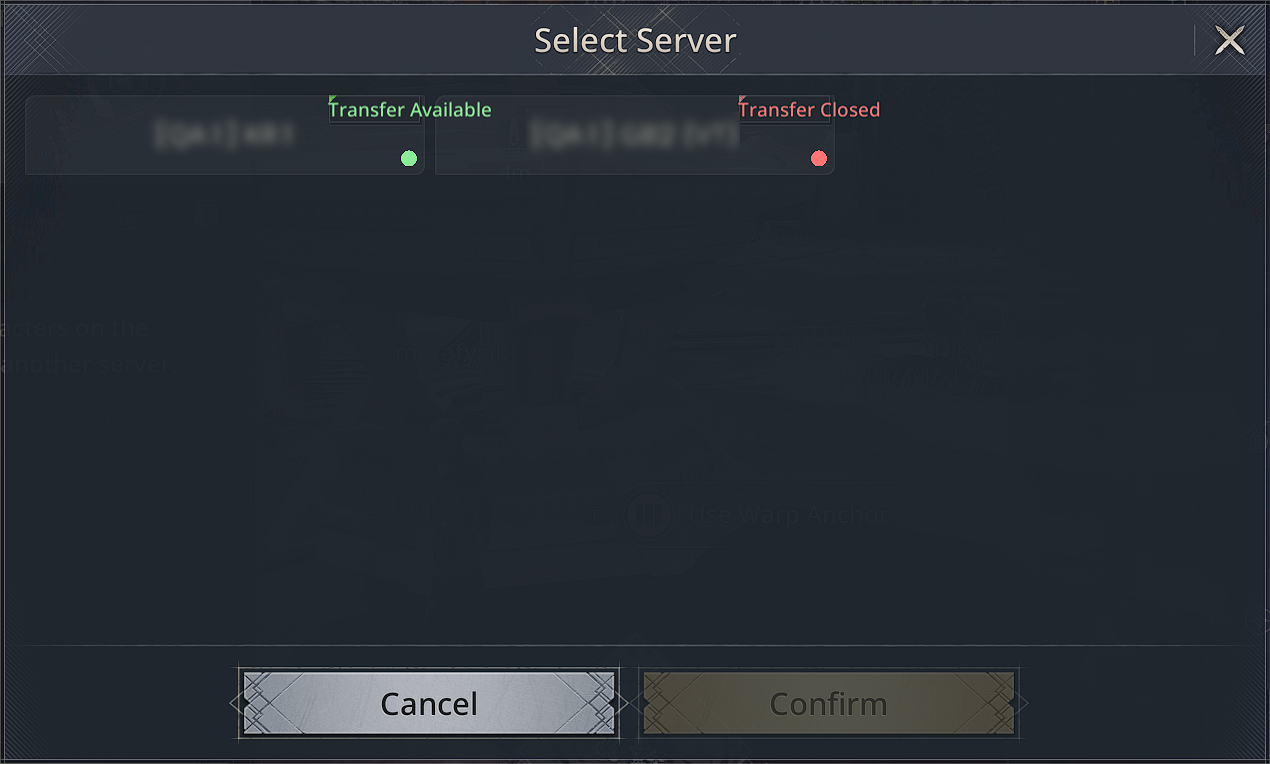
- ④ On the Server Selection screen, choose the server you wish to transfer to.
- From the server list, you can check the availability status of each server (Transfer Available / Transfer Closed).
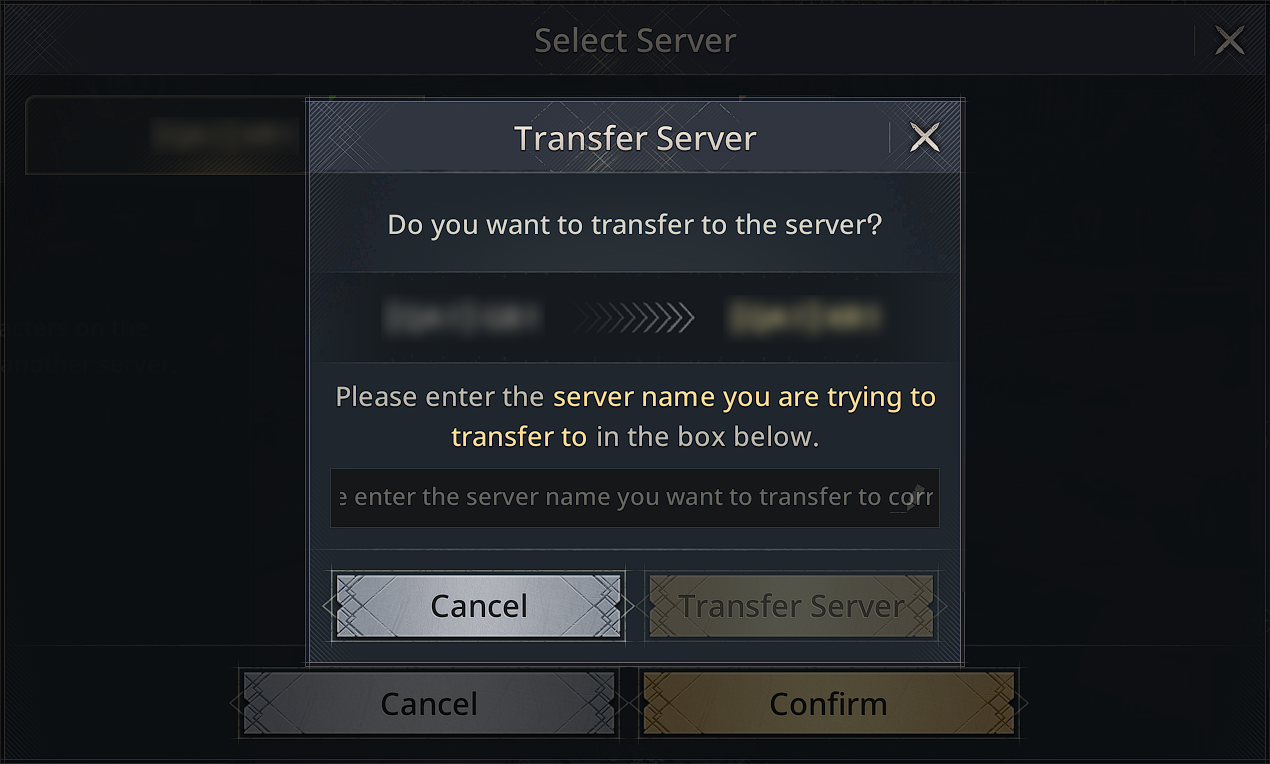
- ⑤ Enter Server Name and Final Confirmation
- To prevent mistakes, enter the name of the server you wish to transfer to and press the “Transfer Server” button to proceed with the transfer.
- ⑥ Server Transfer Complete
- Once all procedures are completed, you will be immediately taken to the title screen, and the Server Transfer process will begin.
- The process will be completed within a few minutes, after which you can log in and continue playing right away.
Notes
- Once a Server Transfer application is completed, it cannot be canceled or restored to its previous state.
- Access to the game will be temporarily restricted while the Server Transfer process is underway.
We wish you all the best as you continue your journey and forge an even greater legacy on your new battlefield following your Server Transfer.
Thank you.