Temporary Workaround for Client Crashes on NVIDIA Graphics Cards
 Architect

Hello,
Experience an infinite world, this is Architect: Land of Exiles!
We have identified an issue causing the game client to crash unexpectedly for some Successors using NVIDIA graphics cards. To help address this issue, we are providing a temporary workaround below.
We apologize for the inconvenience. If you are affected by this issue, please follow the instructions below to apply the workaround.
Issue Details
The Architect game client unexpectedly crashes on some high-performance PC systems.
Temporary Workaround
This may be caused by compatibility issues between NVIDIA graphics features (such as DLSS and Frame Generation) and the latest graphics drivers.
■ Preliminary Setup: Disable Automatic Updates
1. Launch the NVIDIA App installed on your PC and go to [Settings] > [Drivers]
2. Turn OFF the 'Automatically download and install drivers' option to prevent your graphics driver from being automatically updated to the latest version.

Step 1.
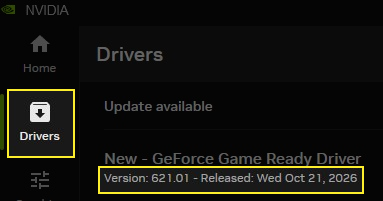
Launch the NVIDIA App installed on your PC and check your current graphics card driver version under the [Drivers] tab.
Step 2.
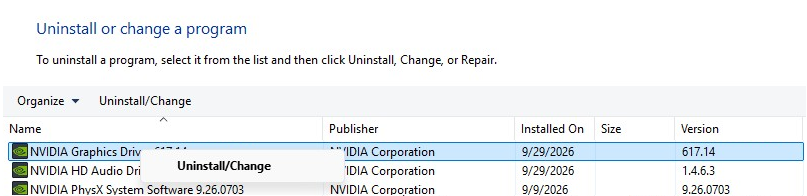
If your currently installed graphics driver is the latest version, uninstall the existing NVIDIA graphics driver through Windows [Control Panel] > [Add or Remove Programs]. (Your display may become temporarily unstable during this process.)
Once the uninstallation is complete, check the program list to confirm that the NVIDIA graphics driver is no longer listed.
Step 3.
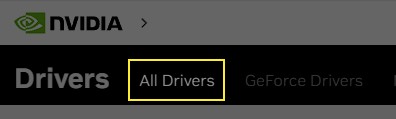
Select ‘All Drivers’ from the [NVIDIA Official Website]
Step 4.
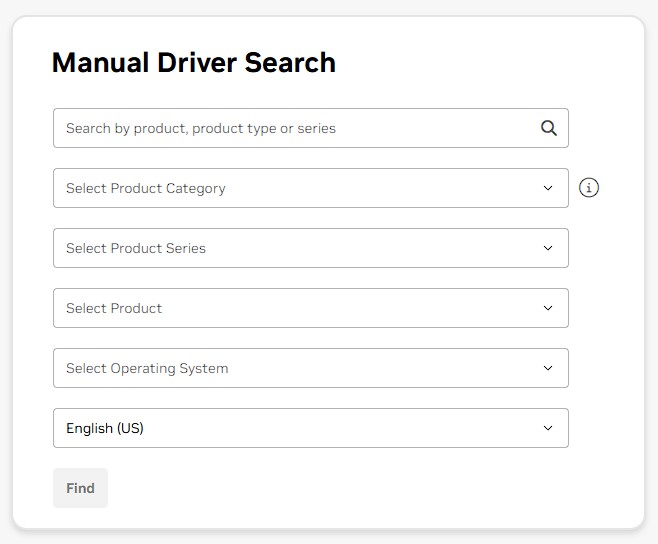
Under [Manual Driver Search], select your graphics card model and operating system.
Step 5.
Once the search results appear, click [View More Versions] at the bottom of the list.
Download and install a GeForce Game Ready Driver version released prior to the latest version.
We sincerely apologize once again for the inconvenience caused. We will continue doing our best to provide a more stable gaming experience.
If we have any further updates regarding this issue, we will share them through our official announcements as soon as possible.
Thank you.