Web Shop/PC MyCard Payments, AP (Architect Point)
 Architect

Hello,
Experience an infinite world, this is Architect: Land of Exiles!
We sincerely thank all Successors who have joined the great journey of Architect with its global launch.
To ensure a smoother experience, we are providing guidance on how to use the Web Shop, PC payments, and the AP (Architect Points) system.
Experience an infinite world, this is Architect: Land of Exiles!
We sincerely thank all Successors who have joined the great journey of Architect with its global launch.
To ensure a smoother experience, we are providing guidance on how to use the Web Shop, PC payments, and the AP (Architect Points) system.
■ Web Shop / PC MyCard Payments Guide
•Official Web Shop
You can purchase game products through MyCard at the Architect Official Web Shop.
•How to Access
- Log in to the Web Shop with your game account and check your character information within the account.
- When you purchase a product, the item will be delivered to your in-game account.
- When you purchase a product, the item will be delivered to your in-game account.
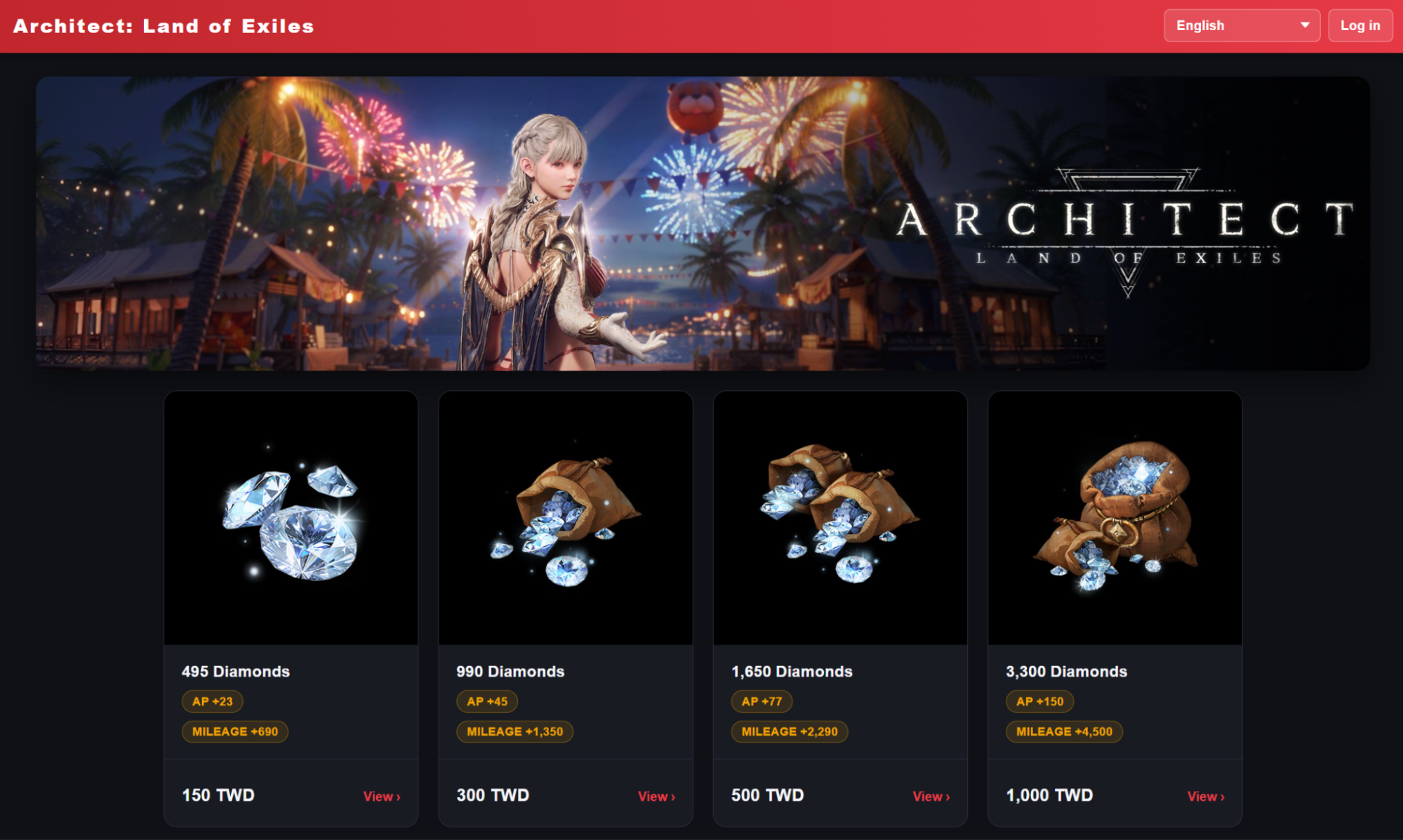
•Official PC Client Payment
You can purchase game products through MyCard in the Architect Official PC Client.
•How to Access
- Enter [Main Menu] → [Shop] in the game.
- When you purchase a product, the item will be delivered to your in-game account.
- When you purchase a product, the item will be delivered to your in-game account.
※ If you wish to use Google Play payment in a PC environment, you can proceed via the “Install on Windows” option from the Google Play Architect page.
■ AP (Architect Points) System
•What is the AP System?
AP (Architect Points) are bonus points awarded when purchasing paid products through the official Architect PC client or official Web Store.
Accumulated AP can be used to purchase paid products through 100% point-only payments.
Accumulated AP can be used to purchase paid products through 100% point-only payments.
•Main Features
- Accumulates when purchasing paid products and is the exclusive payment method for AP-only products.
•Sharing Scope
- AP is shared and managed within the same account region (Global Region / Korea Region).
- Example: AP earned in the Global Region cannot be used on servers within the Korea Region.
- Example: AP earned in the Global Region cannot be used on servers within the Korea Region.
•Supported Platforms
- Where to get: PC client and official Web Store environments
- Where to use: Available freely across all platforms (PC / Mobile) without restriction
- Where to use: Available freely across all platforms (PC / Mobile) without restriction
■ AP System Mechanics
•How do you get AP?
AP is awarded when purchasing paid products via the official Architect PC client or Web Store.
AP is not awarded in “Google Play Games for PC” or mobile in-app purchase environments.
•When will the AP be applied to my account?
- Products that are immediately activated/applied: AP is credited immediately upon purchase completion.
- Products delivered to Mail and need to be claimed: AP is credited together with the product contents when claimed from storage.
- Products delivered to Mail and need to be claimed: AP is credited together with the product contents when claimed from storage.
•How many APs will be given per purchase?
AP awarded is based on the payment amount of the product.
<Official PC Client Payment>
※ AP received and AP purchase price table is based on the product unit price.
※ AP received and AP purchase price table is based on the product unit price.
|
Payment (TWD) |
Bonus AP (AP Received) |
AP Purchase Price (Amount needed when making AP Purchases) |
|---|---|---|
| NT$33 | 5 AP | 100 AP |
| NT$70 | 10 AP | 200 AP |
| NT$75 | 11 AP | 220 AP |
| NT$100 | 15 AP | 300 AP |
| NT$115 | 18 AP | 360 AP |
| NT$170 | 25 AP | 500 AP |
| NT$230 | 33 AP | 660 AP |
| NT$235 | 37 AP | 740 AP |
| NT$330 | 50 AP | 1,000 AP |
| NT$425 | 65 AP | 1,300 AP |
| NT$470 | 75 AP | 1,500 AP |
| NT$530 | 85 AP | 1,700 AP |
| NT$630 | 95 AP | 1,900 AP |
| NT$730 | 110 AP | 2,200 AP |
| NT$940 | 145 AP | 2,900 AP |
| NT$1,190 | 185 AP | 3,700 AP |
| NT$1,400 | 220 AP | 4,400 AP |
| NT$1,640 | 255 AP | 5,100 AP |
| NT$1,870 | 295 AP | 5,900 AP |
| NT$2,190 | 330 AP | 6,600 AP |
| NT$2,350 | 365 AP | 7,300 AP |
| NT$2,550 | 395 AP | 7,900 AP |
<Official Web Shop Payment>
※ AP received as based on the product unit price.
※ AP received as based on the product unit price.
| MyCard Purchase Price (TWD) | Diamonds Received | Bonus AP Received |
|---|---|---|
| NT$150 | 495 Diamonds | 23 AP |
| NT$300 | 990 Diamonds | 45 AP |
| NT$500 | 1,650 Diamonds | 77 AP |
| NT$1,000 | 3,300 Diamonds | 150 AP |
| NT$2,000 | 6,600 Diamonds | 300 AP |
| NT$3,000 | 9,900 Diamonds | 450 AP |
| NT$5,000 | 16,500 Diamonds | 750 AP |
| NT$10,000 | 33,000 Diamonds | 1,500 AP |
■ AP Usage Guide
•Usage Method
In the paid product purchase window, check the [Purchase with AP] option to buy products using your accumulated AP.
•Full Payment Required
When purchasing with AP, 100% of the product price must be paid with AP only. Partial payments combining AP with other methods (cash, Diamonds, etc.) are not allowed.
•Do I get Bonus AP for purchases made with AP?
Products purchased with AP do not award bonus AP.
•Component Change Notice
- For products purchased with AP, any “Diamonds” included in the product will be converted into “Bonus Diamonds.”
- When selecting AP payment, product components will display as “[Bonus] Diamonds.”
- The quantity of Diamonds and all other components remain identical to the original paid product.
- When selecting AP payment, product components will display as “[Bonus] Diamonds.”
- The quantity of Diamonds and all other components remain identical to the original paid product.
Thank you.